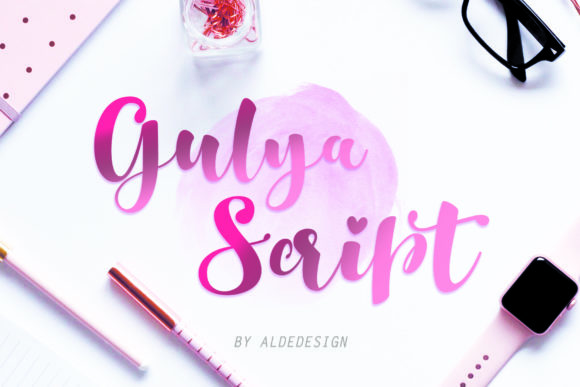
Gulya Script: A Web Designer’s Review
I was in the middle of refining a hero section for a boutique coaching website when I realized the standard sans-serif headline felt too cold. The brand needed warmth, approachability, and a touch of elegance without losing its professional edge. That is when I pulled Gulya Script into the layout. As a web designer who constantly balances aesthetic appeal with user experience, I am always cautious about introducing script fonts into digital interfaces. They can easily become illegible on mobile devices or clash with clean UI elements if not handled correctly. However, testing Gulya Script revealed a typeface that bridges the gap between decorative charm and functional clarity.
This review explores how Gulya Script performs in real-world web design scenarios, from landing pages to social media graphics. If you are building a digital brand identity that requires a feminine yet striking vibe, this font from Script Amp might be the missing piece in your design toolkit.
Visual Personality and Digital Appeal
Gulya Script is defined by its fluid, connected strokes and distinctive curves. It carries a modern typography feel while retaining the organic warmth of a handwritten font. In a digital context, this translates to a typeface that feels personal and inviting. When I placed it in a large display size for a homepage header, the letters danced across the screen with a rhythm that static sans-serifs often lack. The font exudes a cute and distinctive character, making it ideal for brands that want to stand out in a crowded online marketplace.
The "feminine vibe" mentioned in its description is not just about softness; it is about confidence. The strokes are thick enough to hold their own against bold imagery but delicate enough to convey sophistication. For web designers, this means Gulya Script works exceptionally well as a premium font for logo design, hero titles, and short introductory phrases. It captures attention immediately, guiding the user’s eye to the most important message on the page.
Performance in Hero Sections and Landing Pages
The true test of any display font is how it behaves in a hero section. I tested Gulya Script on a landing page for a creative portfolio, pairing it with a high-resolution background image. The result was striking. The font’s weight allowed it to remain legible even when overlaid on complex visuals, provided there was sufficient contrast. I used a subtle drop shadow to enhance readability, a common technique when working with script fonts in web design.
For landing pages, Gulya Script shines in section headings and call-to-action areas where emotional connection is key. Instead of a generic "Welcome," a heading like "Create Your Dream Life" in Gulya Script adds an layer of editorial design flair that resonates with users on a deeper level. It transforms standard web copy into a brand statement. However, it is crucial to use it sparingly. I found that limiting its use to headlines and short subheaders maintained its impact without overwhelming the user. Using it for long paragraphs or dense information blocks would hinder scanning behavior and reduce accessibility.
Readability Across Devices and Screen Sizes
Responsive design is non-negotiable in modern web development. A font that looks beautiful on a 27-inch monitor can become a tangled mess on a smartphone. During my testing, I paid close attention to how Gulya Script rendered on various viewports. On desktop, the ligatures and swashes added a lovely decorative touch. On mobile, however, I had to adjust the line height and letter spacing slightly to prevent the characters from touching adjacent lines.
For small buttons or navigation menus, I would advise against using Gulya Script. Its intricate details do not scale down well for tiny text sizes. Instead, reserve it for larger elements where users have time to appreciate the typography. For body copy, always pair it with a clean sans serif font. This combination ensures that while the headline grabs attention with its creative font style, the main content remains easy to read. This hierarchy is essential for maintaining user engagement and reducing bounce rates.
Strategic Font Pairing for Brand Identity
One of the strengths of Gulya Script is its versatility in font pairing. In my project, I paired it with a geometric sans serif for the body text. The contrast between the organic, flowing lines of the script and the structured, uniform lines of the sans serif created a balanced and professional look. This is a classic technique in web design that helps establish a clear visual hierarchy.
Alternatively, for a more vintage or editorial feel, you could pair Gulya Script with a simple serif font. This combination works well for blogs, online magazines, or brands that want to evoke a sense of tradition and trust. The key is to ensure that the secondary font does not compete with Gulya Script for attention. Let the script font be the star, and let the supporting typeface do the heavy lifting of information delivery.
Best Use Cases and Limitations
Based on my experience, Gulya Script is best suited for:
- Hero Headers: Large, impactful titles on homepages and landing pages.
- Logo Design: Creating memorable and distinctive brand marks for boutiques, coaches, and creatives.
- Social Media Graphics: Adding a personal touch to Instagram posts, Pinterest pins, and Facebook ads.
- Digital Products: Enhancing the presentation of ebooks, course covers, and printable templates.
- Testimonials and Quotes: Highlighting customer feedback in a visually appealing way.
Conversely, avoid using Gulya Script for:
- Body Copy: Long blocks of text are difficult to read in script fonts.
- Navigation Menus: Small text sizes reduce legibility and usability.
- Form Labels and Buttons: Clarity is paramount in interactive elements.
- Accessibility-Heavy Interfaces: Users with visual impairments may struggle with decorative scripts.
Technical Considerations for Web Implementation
Before integrating Gulya Script into your next web project, check the included file formats. Ensure you have the necessary webfont files (such as WOFF or WOFF2) for optimal loading speeds. Slow-loading fonts can negatively impact user experience and SEO rankings. Additionally, review the commercial font licensing terms to confirm that your intended use—whether for a client project, an online store, or a digital template—is covered.
Also, explore any included alternates or ligatures. These features can add unique touches to your design, allowing you to customize the look of specific words or phrases. For instance, using a swashed capital letter at the beginning of a headline can add a extra layer of sophistication. However, use these features consistently to maintain brand identity and visual coherence across your site.
In conclusion, Gulya Script is a powerful tool for web designers looking to inject personality and warmth into their digital creations. When used strategically and paired with clean, readable typefaces, it elevates the overall design aesthetic and helps build a stronger emotional connection with users. Whether you are designing a coaching website, a boutique online store, or a creative portfolio, Gulya Script offers the perfect blend of feminine charm and striking presence.